10 Best Video Transcription Tools in 2026 (Free + Paid)

Transcribing video manually takes roughly 4 hours for every 1 hour of footage. That’s a full workday gone for a single long recording. AI transcription tools now handle this in minutes, and many of them are free or very cheap. According to Grand View Research, the speech recognition market passed $15 billion in 2025. A separate Statista report found that over 60% of businesses now use some form of automated transcription.
We tested 15+ video transcription tools over the past three months. Below are the 10 that gave us the best results for accuracy, speed, and price. For a broader look at video intelligence platforms that go beyond transcription, see our AI video intelligence tools comparison. If you just need a quick transcription right now, you can use our free video-to-text tool or the online transcript generator — both work in your browser with no signup.
Quick Picks
- ScreenApp. Best overall. $19/mo includes transcription, recording, and AI summaries.
- Otter.ai. Best for live meetings. Free plan with 300 min/mo. Pro at $8.33/mo.
- OpenAI Whisper. Best free option. Open-source, unlimited, 95%+ accuracy. Requires technical setup.
Comparison Table
| Tool | Type | Free Tier | Paid Price | Best For |
|---|---|---|---|---|
| ScreenApp | Cloud | 3 videos | $19/mo (annual) | Video workflows + transcription |
| Otter.ai | Cloud | 300 min/mo | $8.33/mo (annual) | Live meetings, real-time |
| Rev.com | Cloud | 45 min/mo AI | $0.25/min AI, $1.99/min human | Professional transcripts |
| Descript | Desktop + Cloud | 1 hour | $16-55/mo (annual) | Video editing + transcription |
| OpenAI Whisper | Local (self-hosted) | Unlimited | Free (open-source) | Developers, multilingual |
| Notta.ai | Cloud | 120 min/mo | $8.17/mo (annual) | Team collaboration |
| AssemblyAI | API | $50 free credits | $0.37/hr (Best tier) | Developers, API integration |
| Riverside | Cloud | Unlimited basic | $19/mo (annual) | Podcasters, recording + transcription |
| TurboScribe | Cloud | 3 files/day | $10/mo (annual) | Bulk transcription on a budget |
| Sonix | Cloud | 30 min trial | $10/hr pay-as-you-go | Multilingual content |
How We Tested
We ran the same 10-minute video clip through each tool. The clip had two speakers, moderate background noise, and some technical terms. We measured:
- Word accuracy against a manual transcript
- Speaker labeling (did it correctly separate speakers?)
- Turnaround time from upload to finished transcript
- Export options (SRT, TXT, DOCX, PDF)
Tools that scored below 85% accuracy on clear audio were cut from the list.
1. ScreenApp
ScreenApp is an all-in-one video platform that handles recording, transcription, and AI analysis in one place. It transcribes uploaded videos and live recordings with speaker labels, timestamps, and searchable text.
Type: Cloud-based Price: Free (3 videos) | $19/mo annual | $25/mo monthly Accuracy: 95%+ on clear audio
What we liked:
- Transcripts are ready in 2-3 minutes for a 1-hour video
- Speaker identification worked well with 2-4 speakers
- You can ask the AI questions about your transcript (e.g., “What did they agree on?”)
- Exports to PDF, TXT, DOCX, and SRT
- Also does screen recording and meeting notes
Where it falls short:
- Free tier is limited to 3 videos
- Accuracy drops with heavy background noise
- Longer videos (3+ hours) take more processing time
Best for: Content creators, students, and teams who want transcription bundled with video recording and AI analysis instead of paying for separate tools.
2. Otter.ai
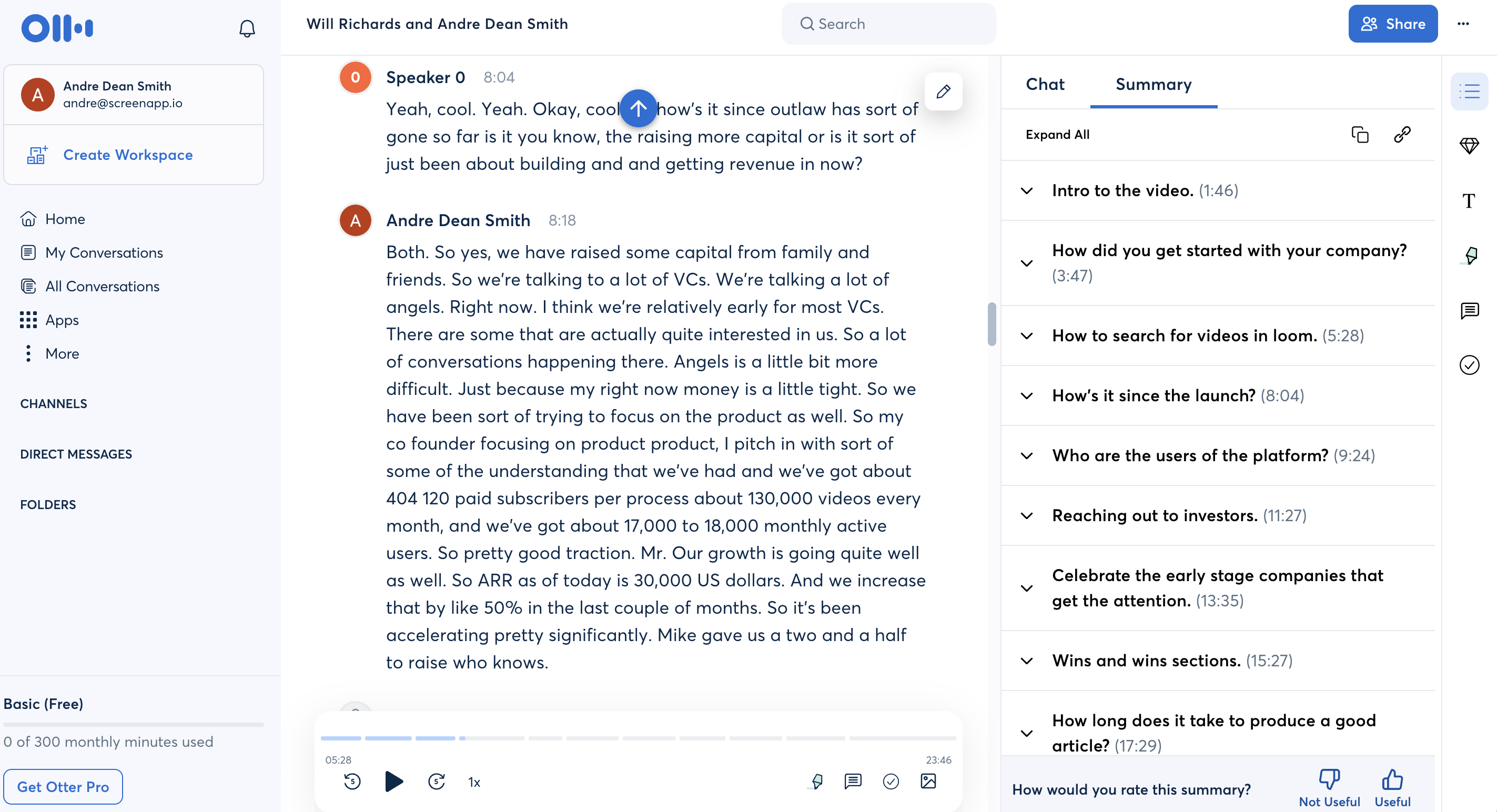
Otter.ai is the go-to tool for live meeting transcription. It integrates with Zoom, Google Meet, and Microsoft Teams to transcribe calls in real time. You can also upload recordings after the fact. For a full comparison of AI meeting agents including Otter, Fireflies, and ScreenApp, see our best AI meeting agents guide.
Type: Cloud-based Price: Free (300 min/mo, 30 min per meeting) | Pro $8.33/mo annual ($16.99/mo monthly) | Business $20/mo annual ($30/mo monthly) Accuracy: 90-95%
What we liked:
- Real-time transcription during meetings is fast and reliable
- Speaker identification labels each person automatically
- Searchable transcripts with keyword highlighting
- Integrates with Zoom, Dropbox, and Google Calendar
- Mobile app for recording in-person conversations
Where it falls short:
- Free tier caps individual meetings at 30 minutes
- Struggles with strong accents and fast speakers
- Import limit of 10 files/month on Pro plan
Best for: Anyone in frequent meetings who needs live transcription and meeting summaries.
3. Rev.com
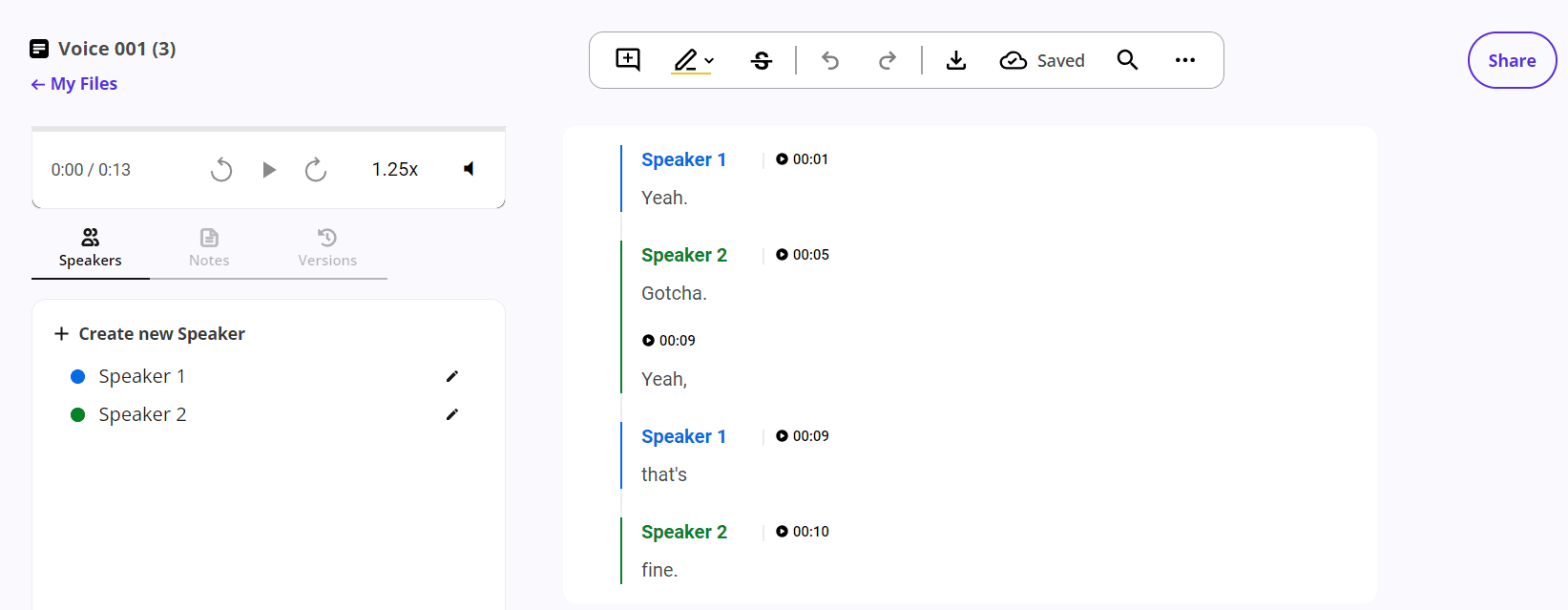
Rev.com offers both AI and human transcription. The AI option is fast and cheap. The human option costs more but hits 99% accuracy for legal, medical, or other high-stakes content.
Type: Cloud-based Price: Free (45 min/mo AI) | AI: $0.25/min | Human: $1.99/min Accuracy: 90-95% AI, 99% human
What we liked:
- AI transcription finishes in about 5 minutes per hour of audio
- Human transcription option when you need near-perfect accuracy
- Built-in editor for quick corrections
- Supports most audio and video formats
- Speaker identification included at no extra cost
Where it falls short:
- Human transcription gets expensive fast ($1.99/min = $119.40/hr)
- AI accuracy is middle-of-the-pack compared to Whisper or ScreenApp
- No real-time transcription for live meetings
Best for: Professionals who need occasional high-accuracy transcripts and don’t mind paying per minute.
4. Descript
-p-2000-1.png)
Descript is a video and audio editor that treats your transcript as the editing timeline. Edit the text, and the video edits itself. Transcription is built into the editing workflow.
Type: Desktop app + Cloud Price: Free (1 hour) | Hobbyist $16/mo | Creator $24/mo | Business $55/mo (all annual) Accuracy: 90-95%
What we liked:
- Edit video by editing text — delete a word from the transcript and it’s cut from the video
- AI voice cloning (Overdub) for fixing mistakes without re-recording
- Filler word removal (“um”, “uh”) with one click
- 10-40 hours of transcription depending on plan
- Screen recording built in
Where it falls short:
- Overkill if you only need transcription (it’s really a video editor)
- Desktop app requires a decent computer
- Free tier is very limited at just 1 hour
Best for: Podcasters and video editors who want transcription integrated into their editing process.
5. OpenAI Whisper
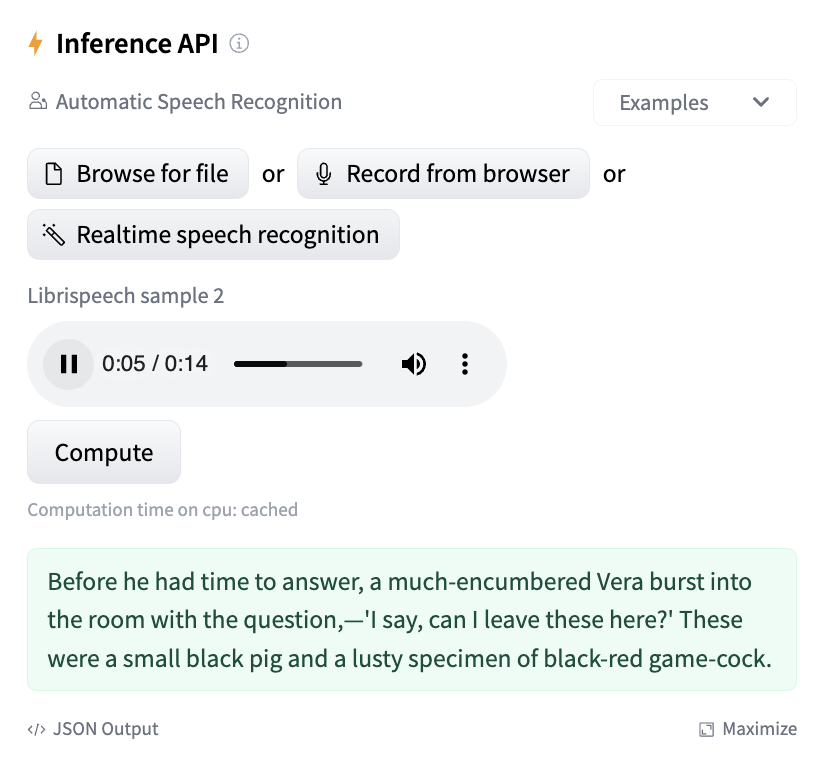
OpenAI Whisper is a free, open-source speech recognition model that runs on your own computer. It supports 99+ languages and consistently scores among the highest in accuracy benchmarks.
Type: Local (self-hosted) Price: Free, open-source, unlimited Accuracy: 95%+ (large model)
What we liked:
- Completely free with no usage limits
- 99+ language support with automatic language detection
- Runs locally so your audio never leaves your computer
- The large-v3 model matches or beats most paid services in accuracy
- Active open-source community with regular improvements
Where it falls short:
- Requires Python and command-line knowledge to install
- Needs a GPU for reasonable speed (CPU transcription is slow)
- No graphical interface by default (third-party GUIs exist)
- No real-time transcription capability
Best for: Developers, researchers, and privacy-conscious users who want top-tier accuracy at zero cost and don’t mind the technical setup.
6. Notta.ai
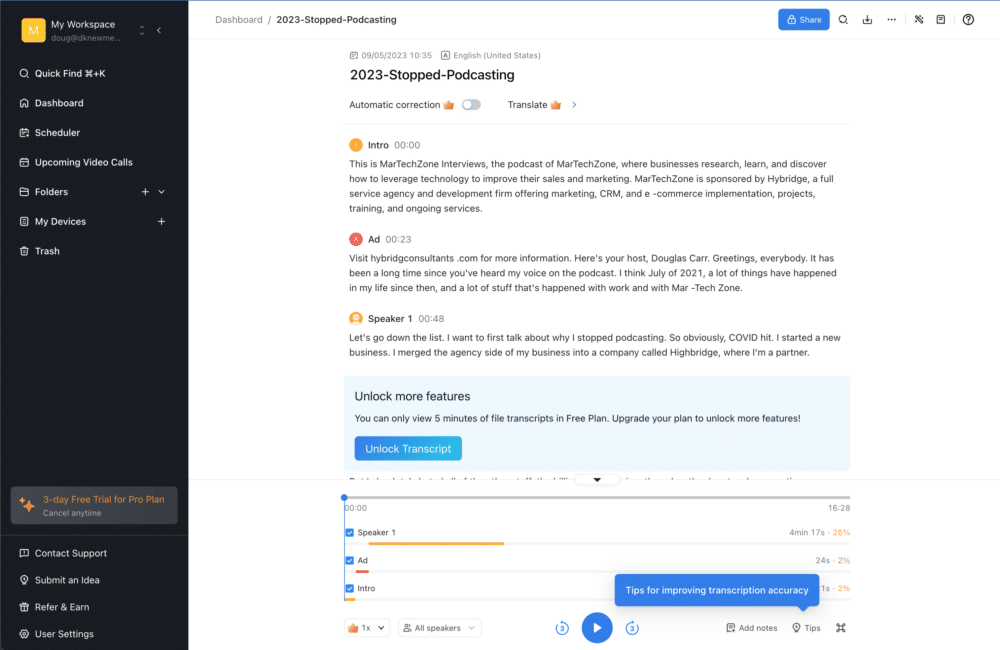
Notta.ai is a cloud transcription platform with strong team collaboration features. It supports 104 languages and syncs across desktop, mobile, and browser.
Type: Cloud-based Price: Free (120 min/mo, 3 min per recording) | Pro $8.17/mo annual ($15/mo monthly) Accuracy: 90-95%
What we liked:
- 104 language support is the widest of any tool here
- AI-powered summaries extract action items from transcripts
- Notta Bot can join Zoom, Google Meet, and Teams meetings on your behalf
- Co-editing and sharing features for team workflows
- Integrates with Notion and Salesforce
Where it falls short:
- Free tier limits recordings to 3 minutes each (practically unusable)
- Pro plan still has monthly caps
- Desktop app can be sluggish on older machines
Best for: Teams that need multilingual transcription with built-in collaboration tools.
7. AssemblyAI
AssemblyAI is a developer-focused transcription API. You get $50 in free credits to start, then pay per hour of audio processed. It includes speaker diarization, sentiment analysis, and content summaries.
Type: API Price: $50 free credits | Best tier: $0.37/hr | Nano tier: $0.12/hr | Add-ons: $0.02-0.05/min each Accuracy: 95%+
What we liked:
- Among the most accurate APIs available (95%+ on our test)
- Speaker diarization, summarization, and sentiment analysis built in
- 99 language support with automatic detection
- Custom vocabulary lists for technical terms
- Pay-as-you-go pricing scales down with volume
Where it falls short:
- No graphical interface — it’s an API, so you need coding skills
- Add-on features (speaker ID, summaries) cost extra on top of base rate
- Not practical for casual users who just want to upload a file
Best for: Developers building transcription into their own apps, and teams with engineering resources.
8. Riverside
Riverside is a recording platform built for podcasters and remote interviews. It includes free unlimited transcription through its standalone tool, and full transcription features in paid plans.
Type: Cloud-based Price: Free (unlimited basic transcription) | Standard $19/mo | Pro $29/mo | Teams $24/user/mo (all annual) Accuracy: 90-95%
What we liked:
- Free transcription tool requires no signup
- Records each participant’s audio and video locally for studio quality
- Transcripts sync with the recording timeline
- Translation to 100+ languages included
- 4K video support on Pro plan
Where it falls short:
- Full feature set requires a paid plan ($19+/mo)
- Primarily a recording tool — transcription is secondary
- Free transcription tool has fewer editing options than competitors
Best for: Podcasters and interviewers who need recording and transcription in one platform.
9. TurboScribe
TurboScribe is a simple, affordable transcription tool. The free plan gives you 3 files per day (up to 30 minutes each), and the unlimited plan costs $10/mo.
Type: Cloud-based Price: Free (3 files/day, 30 min each) | Unlimited $10/mo annual ($20/mo monthly) Accuracy: 90-95%
What we liked:
- Free tier is one of the most generous available (3 files daily)
- Unlimited plan has no caps — users regularly transcribe hundreds of hours
- Supports files up to 10 hours long and 5GB
- Translation to 134+ languages
- Bulk upload and export up to 50 files at once
Where it falls short:
- No speaker diarization on free plan
- Interface is basic compared to tools like Descript or ScreenApp
- No real-time meeting transcription
- No API for developers
Best for: Anyone who needs affordable bulk transcription without monthly minute caps.
10. Sonix
Sonix is a pay-as-you-go transcription platform that scores well in independent accuracy benchmarks (92.83% in one test). It supports 53+ languages with automated translation.
Type: Cloud-based Price: 30 min trial | Standard $10/hr | Premium $5/hr + $22/mo per user Accuracy: 90-95%
What we liked:
- Pay-per-hour pricing is good for occasional use
- In-browser transcript editor with playback sync
- Automated translation included
- Subtitle export (SRT, VTT) with burn-in option
- Multi-speaker detection worked well in testing
Where it falls short:
- No free tier beyond the 30-minute trial
- Standard plan at $10/hr gets expensive for high volume
- Premium plan requires a monthly subscription on top of per-hour fees
Best for: Occasional users who need accurate multilingual transcription without committing to a monthly subscription.
Free vs Paid: What You Get
Most free tiers give you enough to test a tool but not enough for regular use. Here’s what to expect:
Free tiers typically include:
- 120-300 minutes per month (or a few files per day)
- Basic accuracy (85-95%)
- Standard export formats (TXT, PDF)
- Per-recording time limits
Paid plans add:
- Higher or unlimited monthly minutes
- Speaker identification and diarization
- Custom vocabulary for technical terms
- Priority processing and faster turnaround
- Team sharing and collaboration
- API access
The exception is OpenAI Whisper, which is completely free and unlimited but requires technical skills to set up. For most non-technical users, a paid plan on a cloud tool like ScreenApp ($19/mo) or Otter.ai ($8.33/mo) is the simplest path to reliable transcription.
For specialized transcription needs, our AI note-taker handles meeting transcription specifically, and the transcript diarization tool separates speakers automatically.
Tips for Better Transcription
No tool will give you 100% accuracy on bad audio. You can improve results by:
- Using an external microphone instead of laptop or phone mics
- Recording in a quiet room with minimal echo
- Speaking at a steady pace — fast speech drops accuracy by 10-15%
- Avoiding crosstalk — when speakers talk over each other, most tools lose track
- Uploading in a lossless format (WAV or FLAC) when possible, though MP4 and MP3 work fine
For recording tips, our top online voice recorders guide covers the best options for getting clean audio before transcription.
ChatGPT vs Transcription Software
ChatGPT and other general AI chatbots can transcribe short audio clips (under a few minutes), but they can’t process full video files. They also lack speaker labels, timestamps, SRT export, or batch processing. For anything longer than a quick voice memo, dedicated transcription software is the better choice.
ScreenApp for Video Transcription
ScreenApp combines video-to-text transcription, screen recording, and AI analysis in one platform. Instead of uploading your video to one tool, transcribing it, then copying the text into another tool for notes or summaries, you do it all in one place. The AI chat feature lets you ask questions directly about your video content after transcription.
What to Try Next
- Best AI Meeting Agents — compare Otter, Fireflies, Grain, and ScreenApp for meeting transcription
- Online Transcript Generator — paste a link or upload a file, get a transcript in minutes
- AI Summarizer — turn long transcripts into short summaries
- Transcript to Meeting Minutes — convert raw transcripts into formatted meeting notes
FAQ
Is there completely free video transcription software?
Yes. OpenAI Whisper is 100% free and unlimited, but you need Python and a GPU to run it. For browser-based options, TurboScribe offers 3 free files per day, Otter.ai gives 300 free minutes monthly, and ScreenApp lets you transcribe 3 videos free with no credit card.
How accurate is AI video transcription in 2026?
The best tools hit 95%+ accuracy on clear audio with a single speaker. With background noise, accents, or multiple speakers, accuracy typically drops to 85-90%. Human transcription from Rev.com reaches 99% but costs $1.99 per minute.
What video formats do transcription tools support?
Most tools accept MP4, MOV, AVI, WMV, WEBM, and MKV for video, plus MP3, WAV, M4A, and FLAC for audio-only files. MP4 is the safest choice if you’re unsure. Maximum file sizes range from 500MB (free tiers) to 5GB+ (paid plans).
Can I transcribe videos in other languages?
Yes. Whisper supports 99+ languages, Notta covers 104 languages, and TurboScribe handles 134+ languages. Most commercial tools support at least 50 languages. Accuracy varies by language — English, Spanish, French, and German tend to score highest.
How long does video transcription take?
AI transcription is fast. Most tools process a 1-hour video in 2-10 minutes. ScreenApp averages 2-3 minutes for an hour of video. Rev.com’s AI finishes in about 5 minutes. Whisper running locally depends on your hardware — a modern GPU handles it in real-time or faster, while CPU-only processing can take 3-4x the video length.
What’s the cheapest option for regular transcription?
Whisper is free if you can set it up. For cloud tools, TurboScribe at $10/mo (annual) gives unlimited transcription with no caps. ScreenApp at $19/mo adds recording and AI features on top of transcription. Otter.ai Pro at $8.33/mo is cheapest for meeting-focused use but limits you to 1,200 minutes per month.
Do I need to upload my video to the cloud?
Not necessarily. OpenAI Whisper processes everything locally on your computer, so your files never leave your machine. Cloud tools like ScreenApp, Otter.ai, and Rev.com do require uploading, but most delete files after processing. If privacy is a concern, Whisper or a self-hosted solution is the safest bet.
Ready to transcribe your first video? Start free with ScreenApp — no credit card needed, and your first 3 videos are on us.
FAQ
Yes. OpenAI Whisper is 100% free and unlimited, but you need Python and a GPU to run it. For browser-based options, TurboScribe offers 3 free files per day, Otter.ai gives 300 free minutes monthly, and ScreenApp lets you transcribe 3 videos free with no credit card.
The best tools hit 95%+ accuracy on clear audio with a single speaker. With background noise, accents, or multiple speakers, accuracy typically drops to 85-90%. Human transcription from Rev.com reaches 99% but costs $1.99 per minute.
Most tools accept MP4, MOV, AVI, WMV, WEBM, and MKV for video, plus MP3, WAV, M4A, and FLAC for audio-only files. MP4 is the safest choice if you're unsure. Maximum file sizes range from 500MB (free tiers) to 5GB+ (paid plans).
Yes. Whisper supports 99+ languages, Notta covers 104 languages, and TurboScribe handles 134+ languages. Most commercial tools support at least 50 languages. Accuracy varies by language -- English, Spanish, French, and German tend to score highest.
AI transcription is fast. Most tools process a 1-hour video in 2-10 minutes. ScreenApp averages 2-3 minutes for an hour of video. Rev.com's AI finishes in about 5 minutes. Whisper running locally depends on your hardware -- a modern GPU handles it in real-time or faster, while CPU-only processing can take 3-4x the video length.
Whisper is free if you can set it up. For cloud tools, TurboScribe at $10/mo (annual) gives unlimited transcription with no caps. ScreenApp at $19/mo adds recording and AI features on top of transcription. Otter.ai Pro at $8.33/mo is cheapest for meeting-focused use but limits you to 1,200 minutes per month.
Not necessarily. OpenAI Whisper processes everything locally on your computer, so your files never leave your machine. Cloud tools like ScreenApp, Otter.ai, and Rev.com do require uploading, but most delete files after processing. If privacy is a concern, Whisper or a self-hosted solution is the safest bet. Ready to transcribe your first video? Start free with ScreenApp -- no credit card needed, and your first 3 videos are on us.